For new sites

Energine Simple

The Energine core for small sites — business-card sites, landing pages and service pages: a section tree, pages from templates and texts edited right on the page.

Status

In active development. The interface comes in English, Russian and Ukrainian. The code is in the simple branch of the repository on GitHub.

Who it is for

Sites with a few pages and an owner who edits them

Business-card sites

A company or a specialist: a home page, a page per service, contacts.

Landing pages

One page made of sections: first screen, services, reviews, call to action, contacts.

Service pages

First screen, description, prices, questions and answers, call to action.

How a site is made

  1. Install without demo content. The installer fills an empty database with one command, run from the site's web folder: php index.php setup install, with the domain, the database and the administrator's e-mail as options. After it the site has a home page, sign-in, registration, password recovery and the admin.
  2. Pages from templates. In the structure editor, give the home page the Landing template, add a page with the Service template and one with Contacts. Other pages are plain text pages, lists of subsections or the site map. A template of your own is one command, for example setup page --name=about --title="About us" --sections=hero,services,reviews,cta.
  3. Section texts. The owner turns on edit mode and writes the texts on the page. An empty section is not shown on the site; in edit mode it shows a sample text to replace.
  4. Your colors and font. Colors, font, corner radius and page width are variables in one file, theme.css, for the light and the dark scheme; setup css rebuilds the styles.
  5. Check. The admin lists broken links in texts, and setup checklinks does the same in the console; the repository's audits check contrast in both schemes, widths from 320 px and pages without JavaScript errors.
  6. Move to hosting. Install on the hosting, load the database dump of your working copy, copy uploads/ and run setup linker.

Step by step: Your first site.

What you get

The home page of an Energine Simple site with demo content, with a first screen, a contact button and three feature cards

Pages from templates

Landing, Service and Contacts are made of sections: first screen, services, prices, reviews, questions, contacts and a call to action; a template of your own can also have a gallery. Each section is a text the owner edits; its look comes from the theme.
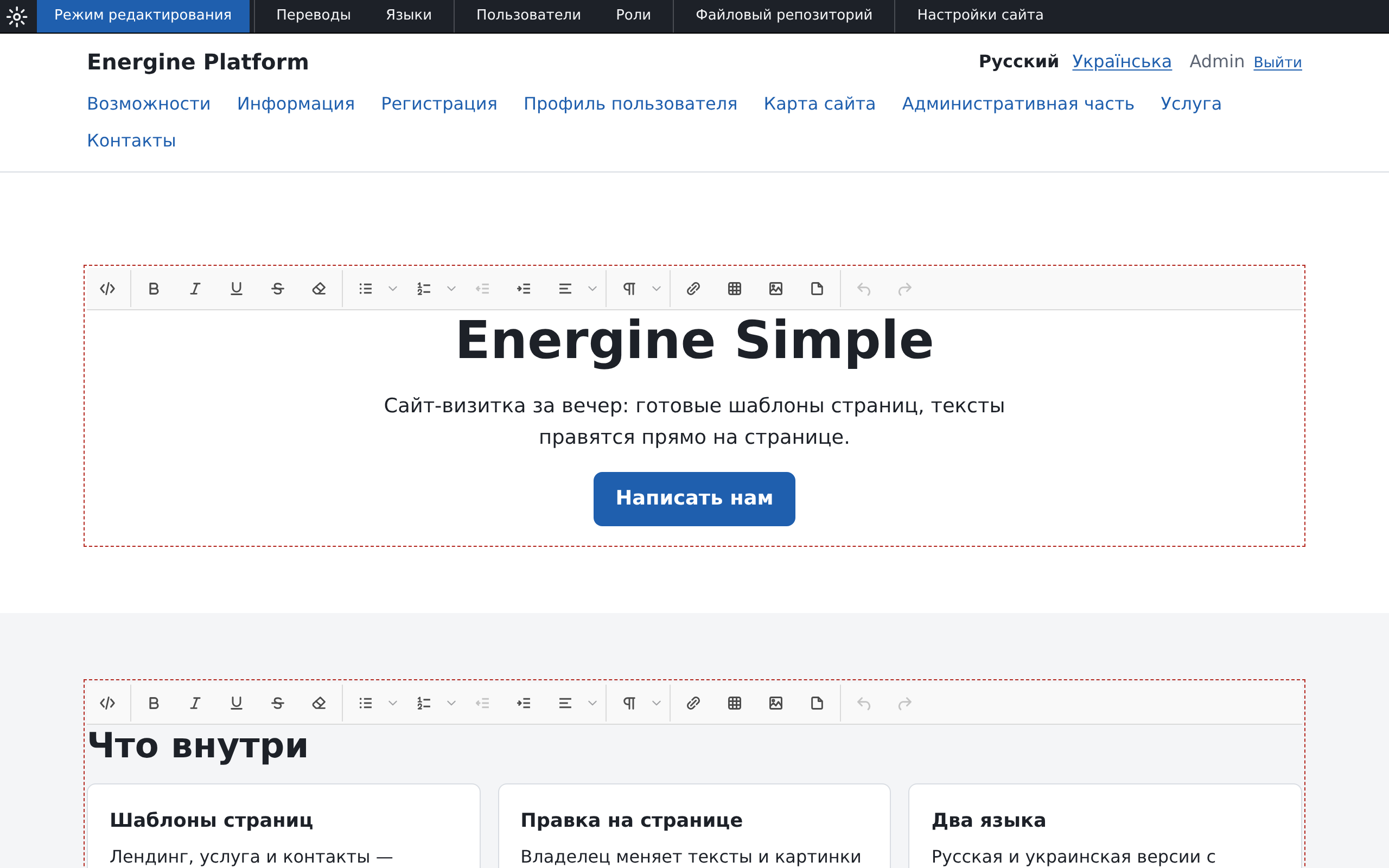
The home page of an Energine Simple site in edit mode, with a text editor toolbar above each editable block

Editing on the page

The administrator turns on edit mode and changes texts and pictures where visitors see them, in the Jodit visual editor. Pictures come from the site's file repository.

The section tree of the Energine Simple admin with the demo site's sections

The admin

The section tree, users and roles, interface translations, the file repository, e-mail templates, site settings, an action log and a report of broken links. A ? in the corner of an admin window explains what to do on that screen.

The role editor of the Energine Simple admin with the Administrator, Guest and User roles and the defaults for guests and users

Users and rights

Users belong to groups, and every group has its own rights on every section. Visitors can register and edit their profile.

The translation editor of the Energine Simple admin with interface text keys, their translations and page navigation

Languages

Pages and interface captions are translated. The installer adds English, Russian and Ukrainian.

The home page of an Energine Simple site with demo content on a phone screen, with the menu folded into a Menu button

On a phone and in the dark

From 320 px to wide screens, with light and dark color schemes and print styles. On a phone the menu folds into a button that works without JavaScript.

Security built in

  • Every POST of the site and the admin carries the visitor's token; a form sent from another site is refused. Deleting, reordering, switching on and clearing happen only by POST.
  • Five failed sign-ins for one login from one IP address lock that login for that address, and twenty from one address lock the address; failures count for 15 minutes.
  • A new password is set through a link that works once, for an hour; the database keeps only a hash of it, and the password-reset form answers the same for any address. No password is ever sent by mail.
  • Registration turns bots away with a trap field and a minimum time to fill in the form.
  • Admin grids, the page tree and forms show data as text: markup in it does not run.
  • Registration and the profile save only the fields of their own form; the profile changes a password only with the correct current one.
  • Cookies set by the server are SameSite=Lax and Secure on HTTPS; the session and the token are HttpOnly. After sign-in a visitor returns only to a page of the same site.

What is built in and what is left to the web server: Security.

Technology and requirements

  • PHP 8.4 or newer with the extensions ctype, dom, fileinfo, gd, json, libxml, mbstring, openssl, PDO, pdo_mysql, session, SimpleXML and xsl; GD with JPEG, PNG and WebP support. Composer only generates the autoloader: there are no third-party PHP packages.
  • MariaDB. The installer and the tests run on MariaDB.
  • XML and XSLT. Components return XML; XSLT templates turn the page into HTML.
  • Plain JavaScript in ES modules, loaded through an import map: no bundler, and nothing to build after an update.
  • The theme is one stylesheet built with Tailwind CSS and kept in the repository, so a site needs no build tools; nothing is loaded from third-party addresses.
  • Mail goes through PHP's mail() or through an SMTP server, with a client of its own.
  • One install, one site. The site's address comes from its configuration.
  • MIT license.

Requirements and the installer step by step: Installation.

What Simple does not have

Compared with Energine 2.13, Simple keeps the core and leaves out the modules: shop, blogs, comments, calendar, form builder, banners, mailings, news and feedback, galleries and page attachments, and several sites in one install. Contacts are links, and a gallery is pictures in the text.

If a site needs these modules, take Energine 2.13.

Get started Documentation Download