
Admin panel
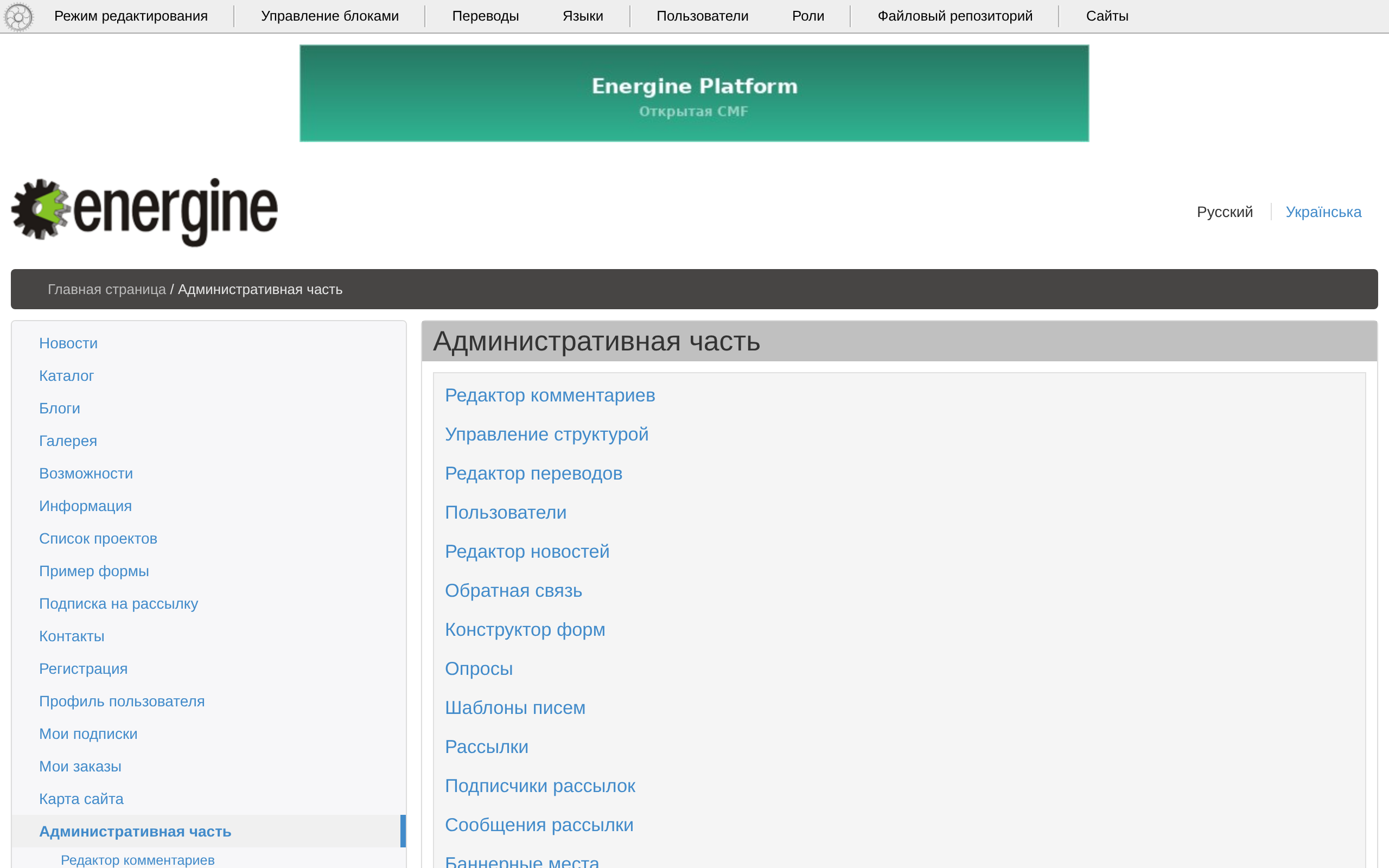
The admin is a part of the site: pages under /admin/, open to administrators, and a toolbar on the site's own pages.
The page toolbar
On every page with the base layout, a user with full access gets the toolbar: «Режим редактирования» (Edit mode), «Управление блоками» (Manage blocks), «Переводы» (Translations), «Языки» (Languages), «Пользователи» (Users), «Роли» (Roles), «Файловый репозиторий» (File repository) and «Сайты» (Sites). The editors open in a window over the page; the logo opens the section tree beside it. Edit mode and blocks are described in Structure and content.
The admin section
/admin/ — «Административная часть» (Administration) — lists its pages: «Управление структурой» (Structure management), «Редактор сайтов» (Site editor), «Редактор переводов» (Translations editor), «Редактор языков» (Language editor), «Редактор новостей» (News editor), «Пользователи» (Users), «Роли» (Roles), «Обратная связь» (Feedback), «Конструктор форм» (Form builder), «Виджеты» (Widgets), «Опросы» (Polls), «Редактор комментариев» (Comments editor), and the pages of mailings, banners, blogs and the shop. The demo content adds «Журнал действий» (Action log), «Оформление разделов» (Section branding), «Рубрики новостей» (News categories), «Подборки» (Selections) and «Группы подборок» (Selection groups).
Lists and forms
- A list loads 50 rows a page, sorts by a column and has a filter with the conditions «содержит» (contains), «не содержит» (does not contain),
=,!=,<,>, «между» (between), «отмечено» (ticked) and «не отмечено» (not ticked). - A form of a multilingual record has a tab for each language. After saving, the list next to «Сохранить» (Save) chooses what comes next: «Закрыть» (Close), «Добавить» (Add), «Редактировать следующую запись» (Edit the next record) or «Редактировать предыдущую запись» (Edit the previous record).
- Lists show the values as HTML; see Known risks.
The action log
With site.action_log in the configuration — on in the template — saves and deletes in lists and the page form are written to share_action_log. The demo content shows them on «Журнал действий» (/admin/action-log/), with «Очистить» (Clear); on an empty site make such a page with the template log.content.xml, which shows as CONTENT_LOG.
Widgets
«Виджеты» (Widgets, /admin/widgets/) keeps the blocks offered by «Управление блоками»: «Название блока» (Block name) and «XML-код блока» (Block XML code). An empty site has the widget «Баннер» (Banner).
Several sites, their domains and properties are kept in «Редактор сайтов»; see Configuration.